Print purchase order
PETUNJUK :
Langkah |
Kegiatan |
1 |
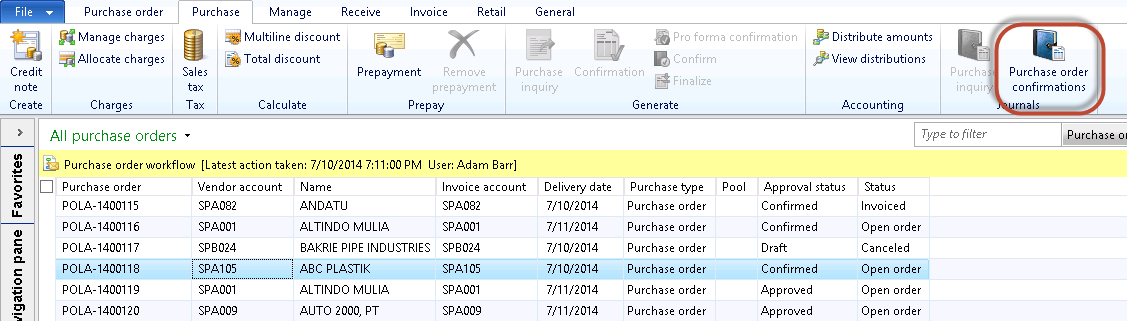
Pilih Procurement and sourcing > Common > Purchase orders > All purchase orders. |
2 |
Muncul tampilan berikut
|
3 |
Pilih PO yang akan di-print. |
4 |
Klik tombol Purchase order confirmation. |
5 |
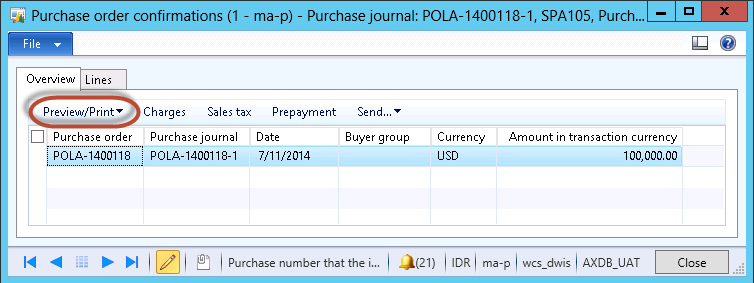
Muncul form berikut
|
6 |
Klik tombol Preview/Print
|
7 |
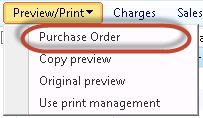
Pilih Purchase Order. |
Created with the Personal Edition of HelpNDoc: Free Web Help generator