Pembuatan batch number
Tabel berikut menerangkan cara membuat Batch number baru :
PETUNJUK :
Langkah |
Kegiatan |
1 |
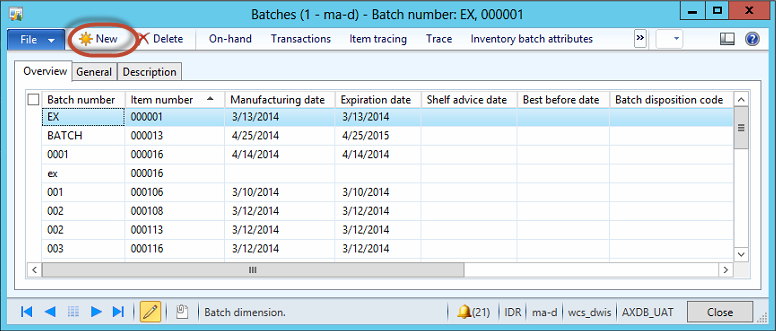
Pilih Inventory and warehouse management > Inquiries > Dimensions > Batches. |
2 |
Muncul form berikut
|
3 |
Klik tombol New. |
4 |
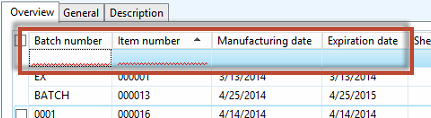
Muncul tampilan berikut
|
5 |
Isikan Batch number yang akan dibuat. |
6 |
Pilih Item number untuk batch number tersebut. |
7 |
Pilih Manufacturing date dari batch number tersebut. |
8 |
Pilih Expiration date dari batch number tersebut. |
9 |
Klik tombol Close. |
Created with the Personal Edition of HelpNDoc: Produce Kindle eBooks easily